 Starting Your Project
Starting Your Project
Starting Your Project
These guides have been created to help you piece together the hardware, software, and information that you need in order to create a product with ANT. Of course the product development process varies depending on whether you are working on a software application, an embedded product (such as a new sensor or display unit), or a mobile app.
If you do not yet understand how the ANT protocol works then it is recommended that you start with: ANT Basics
This guide will outline the main steps in the development of PC applications that can connect to an ANT chip or module, receive ANT messages from a specific ANT+ device, and decode this data according to its ANT+ device profile. It is assumed that you are already familiar with the basic operation of the ANT protocol and the use of network keys.
If you are using a Mac, then you do not need to install any drivers for the ANT USB sticks. Instead, please install the ANT MacOSX Library Package with Source Code.
In the newer versions of Windows you may find that these drivers install automatically the first time you insert the USB Stick. Otherwise Windows drivers for the ANT USB1 and USB2 sticks can be found under Software Tools on the downloads page on the website. Make sure you install drivers that match the type of USB stick you are using. The type of the USB stick(USB1/USB2) is printed on the dongle itself. If using the USB Interface Board (UIF) and an ANT module, you will need the drivers for USB1. Full instructions for installing the drivers for the USB stick are available in the "ANT Development Kit User Manual"
Once the ANT USB stick has been successfully installed, it should be listed on the Device Manager as a Universal Serial Bus controller. The name of the device will vary depending on whether the device is a commercial ANT USB1 or USB2 stick, or an interface board connected to an ANT module from an ANT development kit.
Important!
If drivers for an ANT USB stick bundled with an ANT+ enabled consumer product have already been installed, it is not necessary to install additional drivers. Only one application can access the ANT USB stick at a time. As such, all 3rd party applications (e.g Garmin ANT Agent) must be closed to allow the ANT+ development tools and your own applications access to the USB device.
Note for Mac Developers: ANTwareII and SimulANT+ use the .NET framework, and are therefore unavailable for Mac OS. However, there is a version of the ANT Library Package for Mac OS that can be used to develop ANT and ANT+ enabled applications for Mac OS. A sample Xcode project is provided; please refer to the DEMO_LIB and DEMO_DYLIB targets to get started.
One of the key tools in ANT+ application development is SimulANT+. This software tool allows developers to create applications compatible with ANT+ sensors without the need for a physical sensor to generate ANT+ data during development (and vice versa). Before starting to work on custom ANT+ applications, we highly recommend becoming familiar with SimulANT+. This application, along with its user guide, is available on the downloads page.
NOTE: The old ANT+ Sensor and Display Simulators have now been replaced by SimulANT+ for most device profiles.

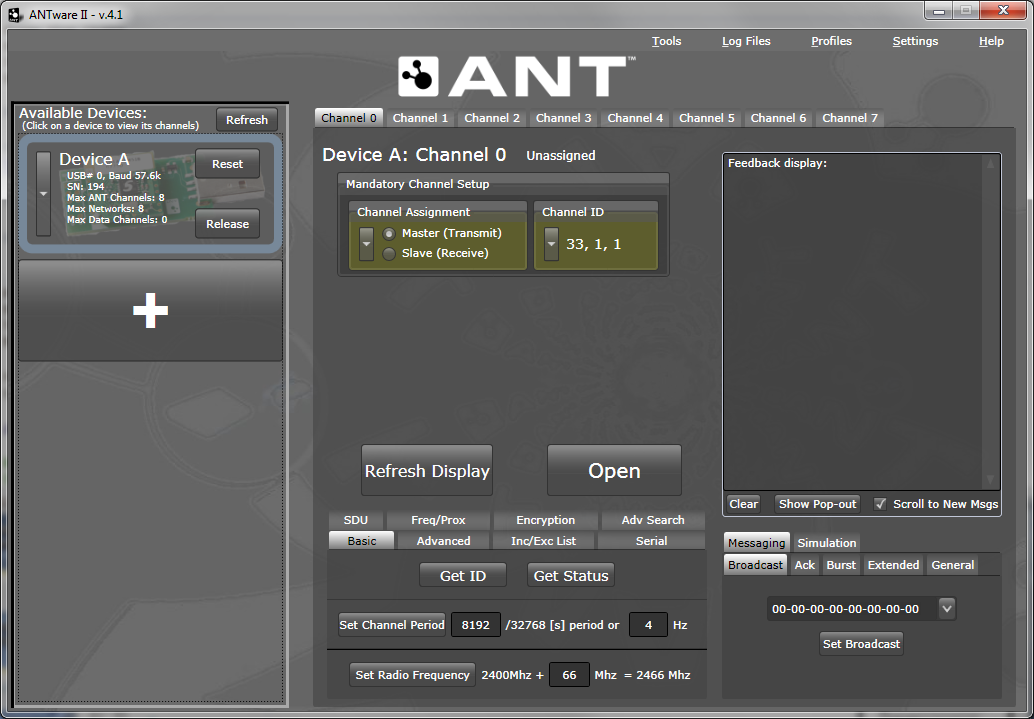
To gain hands-on experience with ANT, we recommend getting familiar with ANTwareII as your next step. ANTwareII is a GUI application used to control ANT devices, and it is an excellent resource for exploring the capabilities of ANT. ANTwareII can be used to set up ANT channels and experiment with ANT’s configuration commands. This application, along with its user guide, is available on the downloads page.
The ANT Windows Library Package contains a set of libraries to facilitate development of ANT enabled applications, along with demonstration applications illustrating the usage of the ANT libraries. The libraries contain functionality to connect to ANT enabled USB sticks, handle the low level serial communication, ANT message framing, and optional logging of raw messages during communication sessions for debug purposes. The library package (including full source code) is available on the downloads page.
The ANT_Libraries.sln can be opened and compiled directly with Visual C++ 2008. This solution includes all settings to build the libraries and accompanying demos. Please have a look at the readme.txt file included within the Library Package, as it outlines its contents, the different projects available, and the dependencies between projects.
To get started:
The source code of the demo applications is a great starting point to get familiar with the ANT library; all commands needed to configure and open an ANT channel are explained through documentation within the code.
The ANT_NET_Libraries.sln contains the ANT Managed library, for use with .NET applications. The ANT_LIB solution must be built before attempting to use the managed library, to resolve dependencies. Alternatively, the DLL’s from the BIN directory may be copied into the working directory of the built project. Copying the ANT_NET.xml file as well, and including it in a project using the ANT_NET.dll will enable IntelliSense documentation for the ANT Managed Library.
The DEMO_NET project is the best example to refer to in order to get familiar with the usage of the managed library. To get started with this code:
Apart from the code related to loading the libraries and connecting to the USB stick, almost all the function calls in the libraries correspond to messages described in the "ANT Message Protocol and Usage Document". Please refer back to this document for detailed descriptions of each of the commands.
ANT+ Device Profiles define the channel parameters and format of the data payload of specific devices. In other words, for a display device, a device profile specifies how to configure an ANT channel to receive data from a particular sensor, and how to decode the data received from that sensor. For a sensor device, a device profile specifies how to configure an ANT channel to send data, and how to format the sensor data to be transmitted.
Device profiles are available on the downloads page. To access them just sign up as an ANT+ Adopter. Each device profile contains a detailed specification of the channel parameters and data format for each sensor type.
For sample code implementing some profiles, refer to the source code of the ANT+ simulator, (also available on the downloads page). To build the code, you can use Microsoft Visual C++ 2008 or later. The “devices” directory within the project contains the code specific to each sensor and display device, and can serve as a reference for PC applications implementing ANT+ functionality.
Embedded C reference code for the MSP430 for some of the profiles is also available on the downloads page, under 'ANT+ Embedded Reference Designs'.
Registration as an ANT+ Adopter also provides access to the ANT+ section of the forum, with additional resources regarding specific device profiles and ANT-FS.


